Business software for those who service cash registers.
Hundreds of telematic cash registers (RT), cash recyclers and scales at your customers' premises, each with its own due dates. With the Machines module of KeyStore in Cloud you see which registers aren't transmitting, which inspections fall due this week and where the shops are on the map. The technician closes the job from their phone with the customer's signature, and the next inspection updates by itself.
Illustration of the module: not a screenshot of the software.
How it works
Getting started.
Your machine fleetWe import the machines from the program you use today, or you add them by scanning the register's QR code: serial number, brand, model and inspection fill themselves in.
Status from the Revenue AgencyEvery day at 5 a.m. the program reads the status of all the registers by itself from the Revenue Agency's public page and shows you the ones that aren't transmitting; one click re-reads them whenever you like.
Visits and jobsDue dates tell you who to visit, the map where to go; the technician closes the service report from their phone and the due date moves on by itself.
Screenshots
The Machines module, at work.
Real screenshots of the software, shown in Italian. Customer names, addresses, contact details and serial numbers are fictitious.
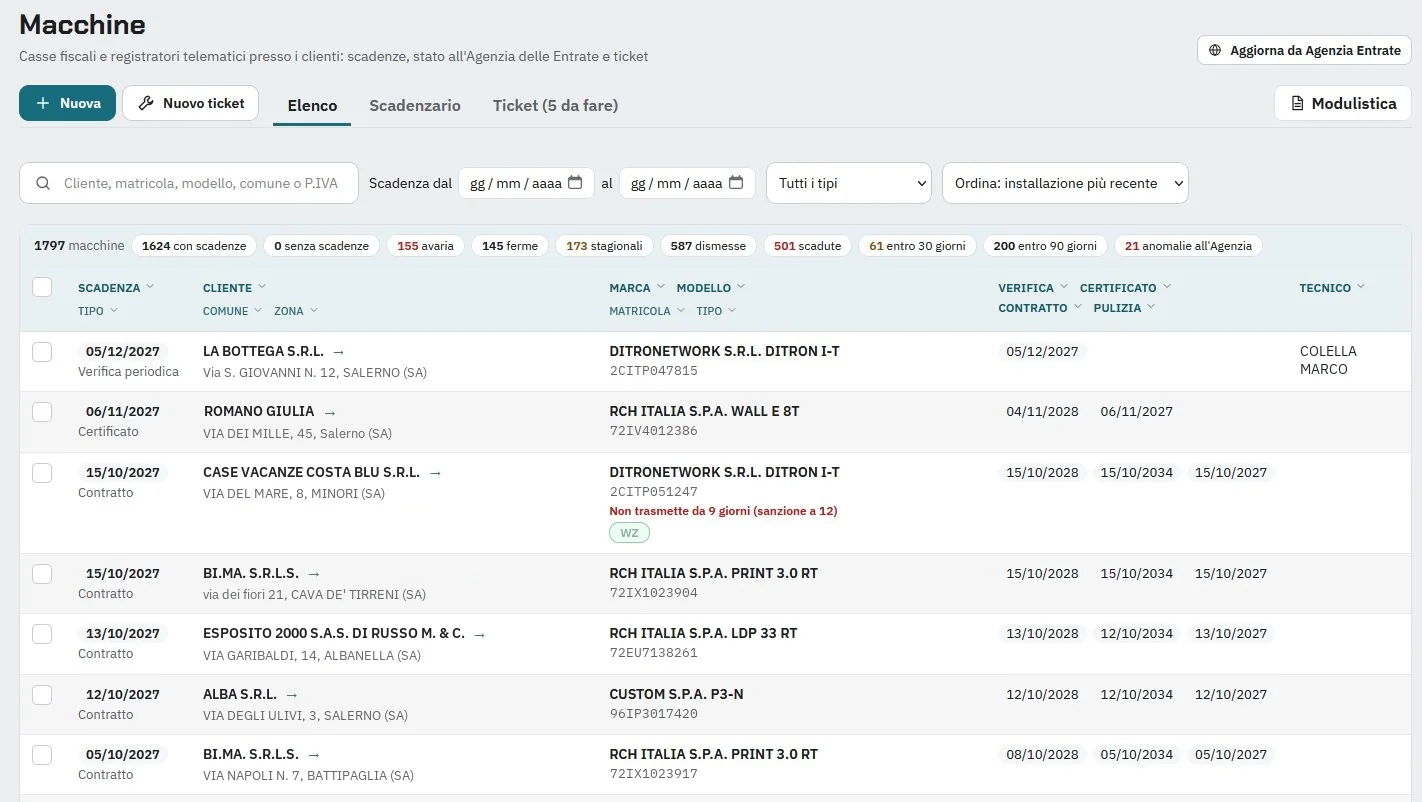
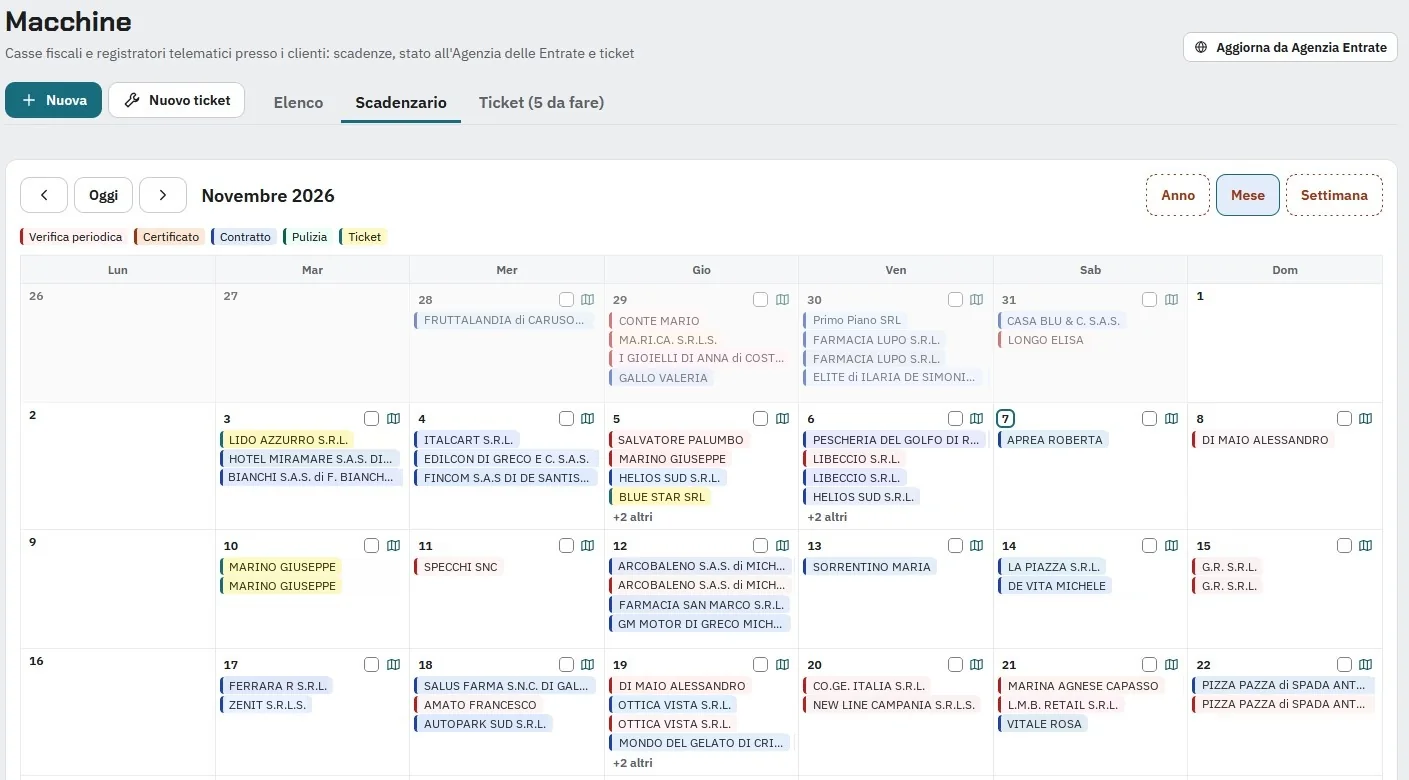
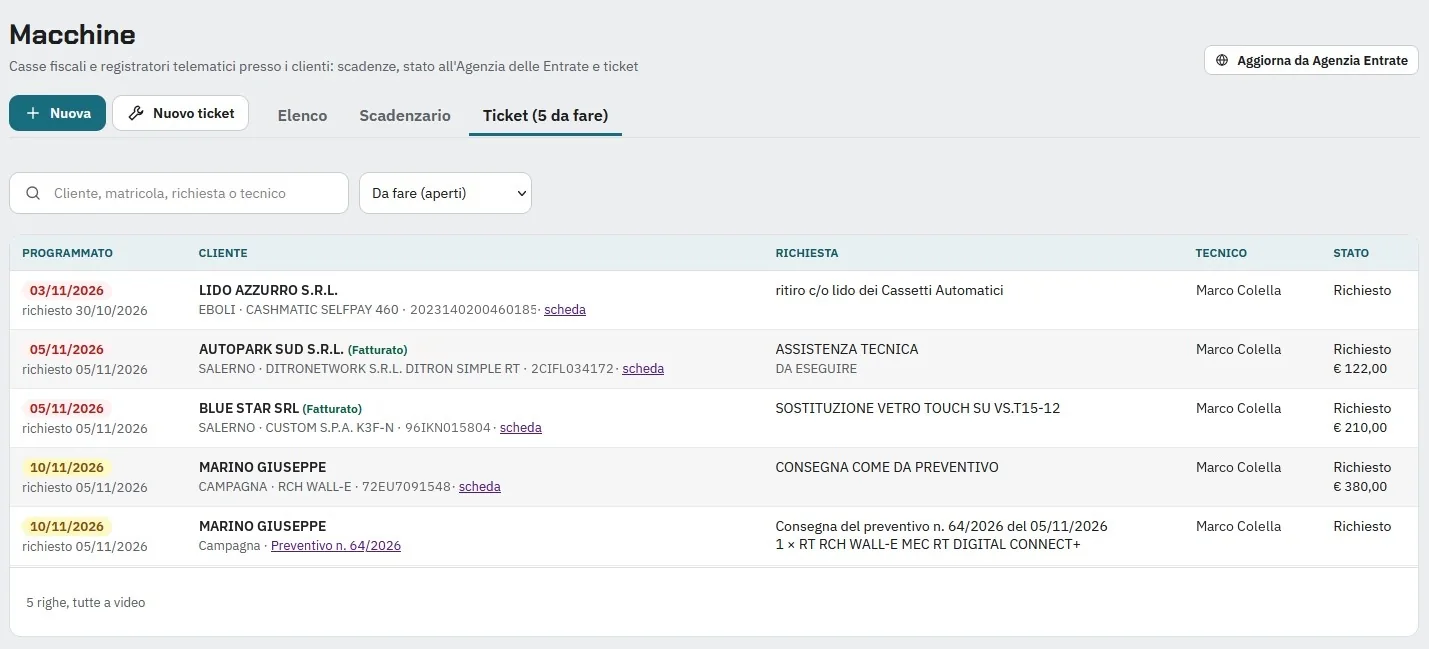
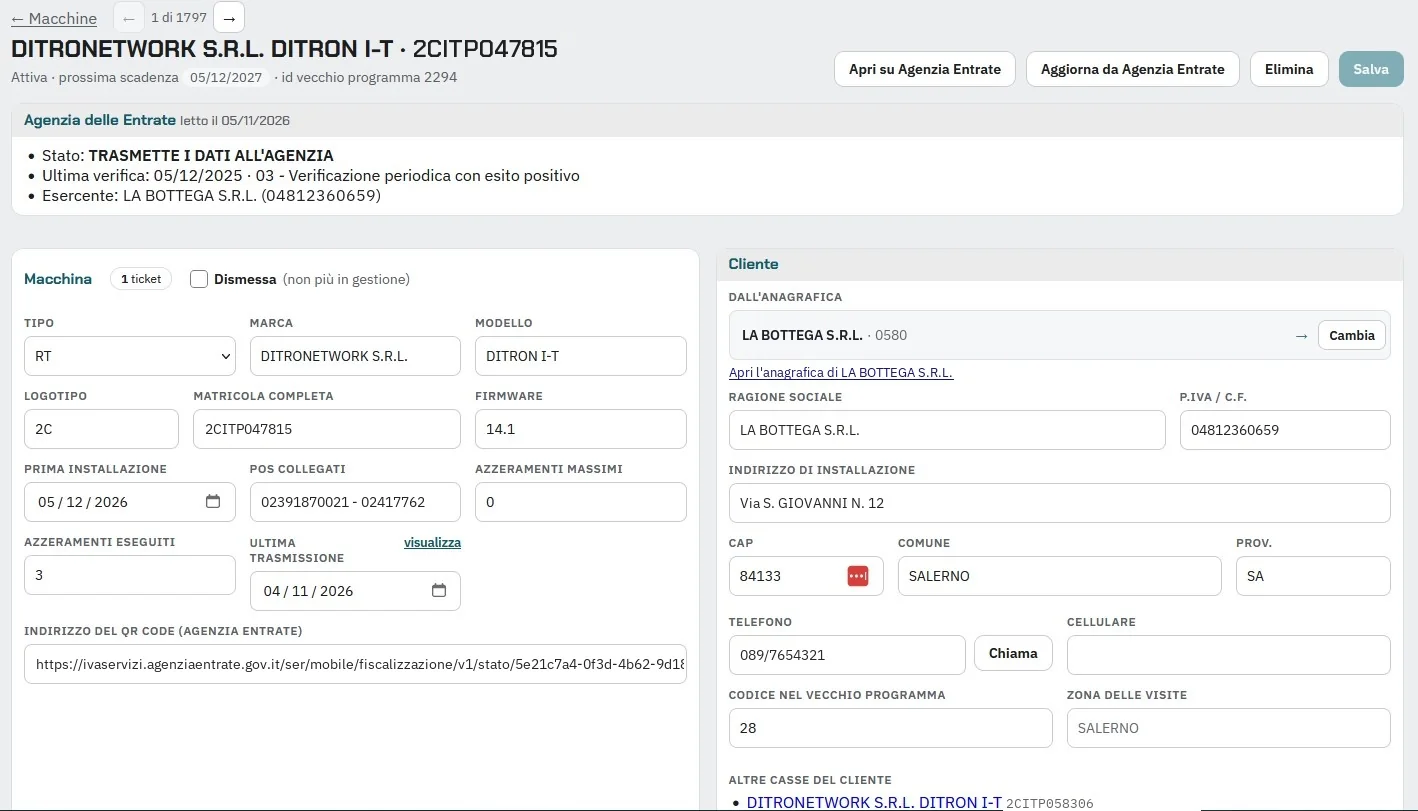
Machine list. At the top, the counts: faulty, idle, seasonal, decommissioned, overdue and anomalies at the Agenzia. For each machine, the next due date, an alert if it isn't transmitting and the button to message the customer on WhatsApp.Due dates. Periodic inspections, certificates, contracts, cleaning and tickets day by day, with the map of the shops to visit.Tickets. The jobs to do with date, machine, request and technician; those already invoiced are marked.Machine card. The status read from the Agenzia delle Entrate, serial number, firmware, linked card terminals, last transmission and the customer's details.
Features
Your whole machine fleet, under control.
Cash registers, cash recyclers, scales
For each machine: type, brand, model, serial number, firmware, customer, installation address, zone, assigned technician, contract and agreed price. Due dates for periodic inspection, certificate, contract and cleaning, with colours for those coming up.
Status read from the QR code
From the register's QR code the program reads the Revenue Agency page: status, last transmission, last periodic inspection (verificazione periodica), firmware, merchant and linked card terminals. It does this by itself every day at 5 a.m. and, when needed, with a single button, on one machine or all of them. Deactivated registers become decommissioned by themselves.
Faulty and idle registers
You see straight away the registers that haven't transmitted for more than 8 days, with an alert at 12, and those idle for over 60, to decommission with a click. Seasonal and decommissioned registers and anomalies, such as a merchant different from the customer, are shown separately.
WhatsApp alert to the customer
For registers that haven't transmitted for 9 to 30 days, the message to the customer is already written: you check it and send it with one click.
Due dates with a map
Inspections, cleaning, contracts and scheduled tickets by year, month or week; in the weekly view, visits are grouped by zone. The map shows the shops to reach over one or more days.
Tickets to invoice
Request, technician, scheduled date and work done. When the job is finished, the ticket becomes an electronic invoice or a delivery slip with the agreed price. An accepted quote creates the delivery ticket by itself.
Service reports from the phone
The technician sees their tickets with address and phone number. At the start they record their GPS position and distance from the machine; at the end, outcome, notes, payment collected and the customer's signature. On the dashboard you see who's at work.
The inspection updates by itself
When you close a periodic inspection, the last inspection takes the date of the job and the due date moves forward by 24 months. For cash recyclers, cleaning moves forward by 6 months.
Your forms, filled in by themselves
Upload the PDF of the forms you use, for example the periodic inspection form: the program recognises the boxes and fills them in with company, customer, merchant, serial number, inspection and job. You can print hundreds of them in a single PDF.
Good to know. The program reads register status from the public Revenue Agency page the QR code leads to: notifications to the Agency are still made through its portal, as usual. The Machines module costs €150 a year plus VAT and is added to a KeyStore in Cloud plan: see the pricing page.
Frequently asked questions
What service centres ask us.
Does the program send notifications to the Revenue Agency (Agenzia delle Entrate)?
No: it reads register status from the public page the QR code leads to. Activations, inspections and decommissioning are notified as usual through the Agency's portal.
How often is register status updated?
Every day at 5 a.m. the program reads all the registers by itself. You can also press “Update from Agenzia Entrate”, on one machine or all of them: the program starts with the ones read longest ago and reads each register at most once a day.
How is the periodic inspection due date calculated?
24 months from the last inspection. It updates by itself when you close the inspection ticket or when it's read from the Revenue Agency.
Are the PDF forms ready-made?
You upload the PDFs of the forms you already use: the program recognises where to write company name, VAT number, serial number and the other details, and you can move the boxes by hand. After that they fill themselves in.
Does the technician have to use the business software?
From their phone they log in as a technician and see only their tickets and service reports, full screen.
Can I bring my machine fleet over from my old program?
Yes: our support team does the import, and the test is free.
How much does it cost?
The Machines module costs €150 a year plus VAT and is added to a KeyStore in Cloud plan: the plans are on the pricing page.
Who develops it?
ATSoft, a software house based in Camposano, near Naples, in business since 1993: phone +39 081 235 42 19 (Italian and English), WhatsApp +39 333 223 3552 (we reply in English within the day).