Business software for your computer shop, from the counter to the repair lab.
A computer shop sells, repairs and keeps chasing distributor price lists. KeyStore in Cloud keeps it all together: repair sheets with a QR code the customer scans to see how the repair is going, serial numbers of what you buy and sell, supplier price lists updated automatically every day, and data sheets from Icecat.
Illustration of the areas: not a screenshot of the software.
How it works
Getting started.
We bring your data acrossWe import your customers, suppliers and items from the program you use today. The import test is free.
We connect your distributorsOur support team sets up your suppliers' price lists: you enter the credentials and choose the update time.
You work, at the counter and in the labSell with the barcode scanner, open repair sheets and invoice with electronic invoicing.
Screenshots
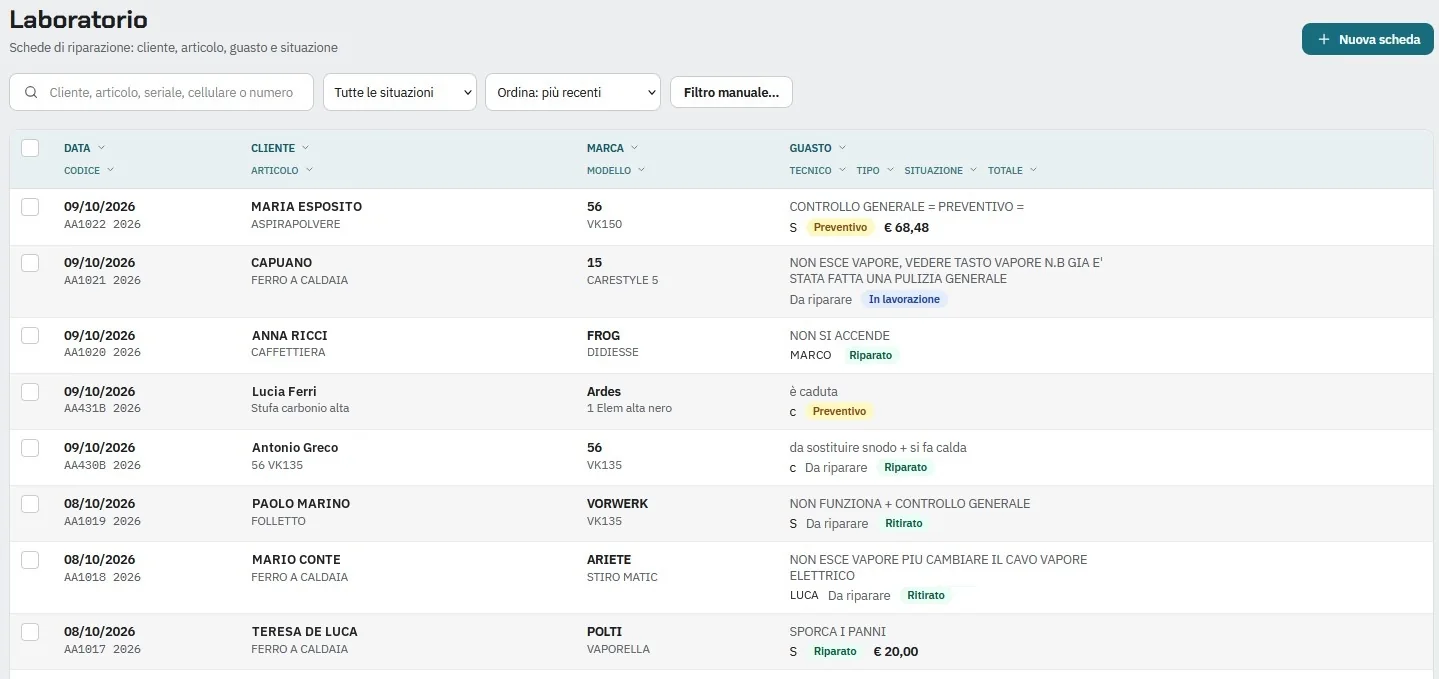
The repair lab, at work.
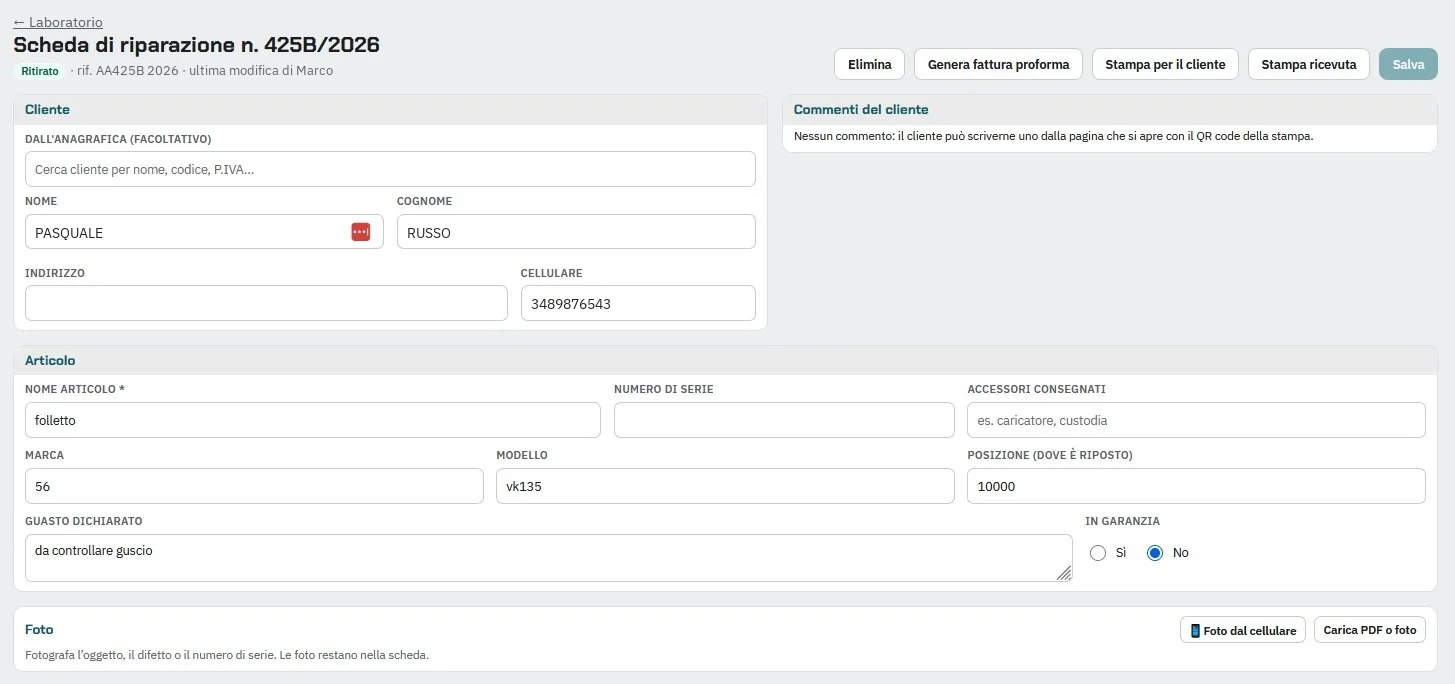
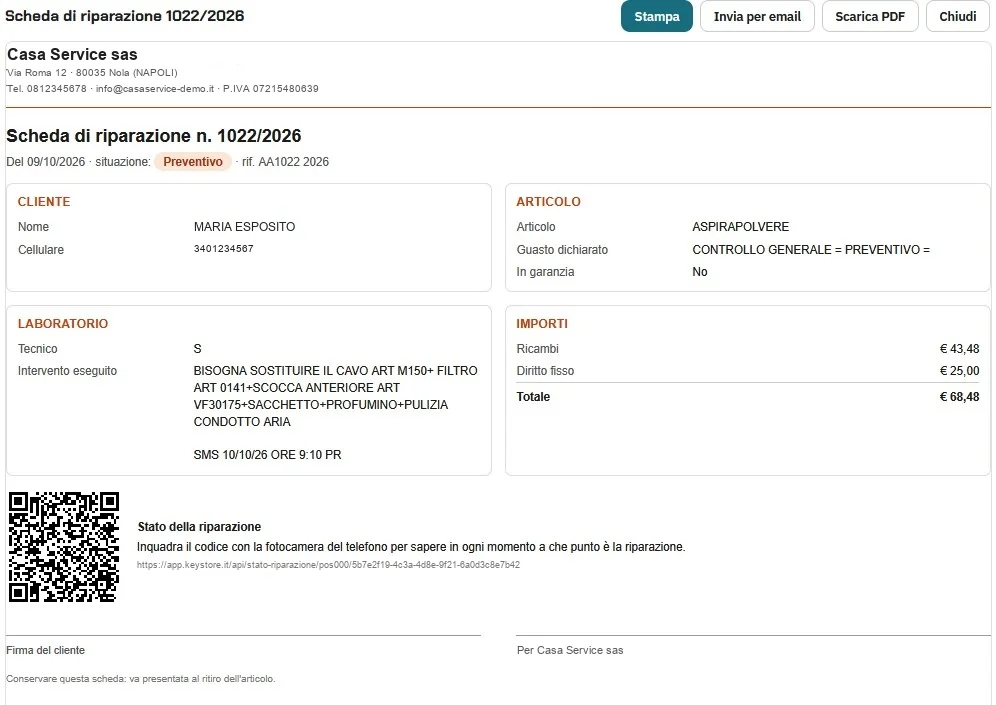
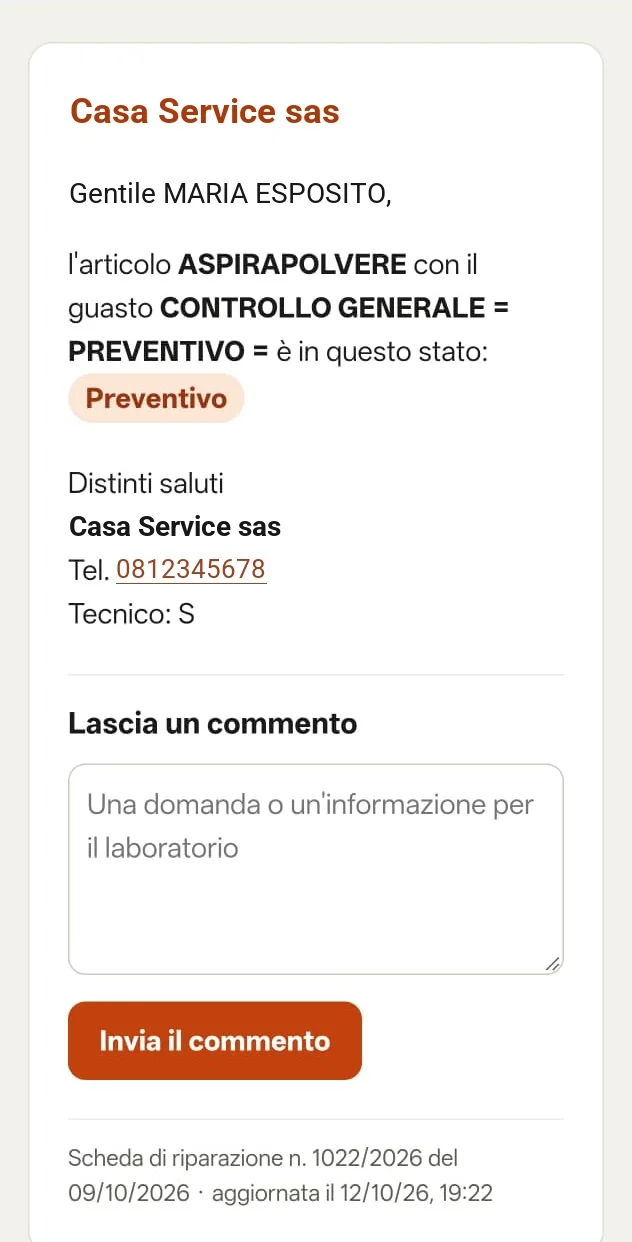
Real screenshots of the software, shown in Italian. Customer names, addresses, contact details and serial numbers are fictitious.
Repair sheets. Customer, item, fault, technician and status, with a colour that shows where each repair stands.The repair sheet. Customer, item with serial number, accessories handed in, fault and warranty; you take the photos with your mobile. From here, the pro forma and the printout for the customer.The printout for the customer. With the QR code and space for signatures.On the customer's phone. They scan the QR code and see the status; they can leave a comment for the repair lab.
Features
Built for shops that sell and repair.
Repair sheets
Customer, item with serial number, accessories handed in, reported fault, warranty, technician and work done. You take photos of the item and the fault with your mobile and they stay in the repair sheet. The amounts for parts, fixed fee, transport and repair add up to the total by themselves.
The customer scans the QR code
The printed repair sheet has a QR code: the customer scans it and sees on their phone how the repair is going, with no app. They can leave you a message, which reaches you in the business software and, if you like, on your mobile.
Where it stands, at a glance
In progress, quote, waiting for parts, sent for service, repaired, collected: each status has its own colour, in the list and in the repair sheet.
From repair sheet to invoice
With one click the repair sheet becomes a pro forma with item, serial number, fault and work done; from there, the electronic invoice.
Distributor price lists, every day
The business software downloads your suppliers' price lists at a set time: it creates new items, updates costs and availability at the supplier, flags discontinued items and warns you about costs that have changed a lot. Your own stock levels are left untouched.
Data sheets from Icecat
From the barcode, or from brand and manufacturer code, you fetch the product's specifications, description, photos and PDFs from the Icecat catalogue. Your company needs its own Icecat account.
Serial numbers
Enter serial numbers in the document lines and find every number with its history: when and from whom you bought it, when and to whom you sold it. From the Pro plan.
Counter sales
The POS screen reads barcodes from the scanner or the camera, keeps up to four carts open and takes the items out of stock. From the Pro plan.
Your online shop
With the PrestaShop module, items, photos, prices and quantities go to the website when you save, and orders arrive in the business software every 5 minutes.
Does the customer have to download an app to check the repair?
No: they scan the QR code on the repair sheet with their camera and a page opens with the status. It doesn't show amounts, address or mobile number.
Does it let me know when the customer writes?
Yes: the message appears in the business software within about twenty seconds for all your colleagues and, if you turn on alerts, it reaches your mobile.
Which supplier price lists can you connect?
The ones the supplier makes available via FTP or on the web: our support team sets up the connection, you enter the credentials and choose the time.
Does the price list update change my prices?
Not by default: it updates costs and availability at the supplier. Selling price and descriptions are updated only if you choose so.
Can I find out who I sold a serial number to?
Yes: search for the serial number and you see all the documents it appears in, purchases and sales.
I already have a PrestaShop website: does it connect?
Yes: with the PrestaShop module, items, prices and quantities go to the website and orders arrive in the business software.
Who develops it?
ATSoft, a software house based in Camposano, near Naples, in business since 1993: phone +39 081 235 42 19 (Italian and English), WhatsApp +39 333 223 3552 (we reply in English within the day).
Let's talk
Do you run a computer shop?
We show you how it works and set it up for your business. Read all the features of KeyStore in Cloud and the prices on the pricing page.